Script compilation to executable files is one of the features we have added in PowerGUI Pro 3.0.
You would likely want to use compile a script when you want to share it in the enterprise environment and you are not sure whether the other person is comfortable running scripts or you simply don’t want risking someone modifying the code.
To compile a PowerShell script:
- Open the script in PowerGUI Pro Script Editor,
- On the Tools menu, click Compile Script,
- Then specify the name and path for the exe file you want to create:
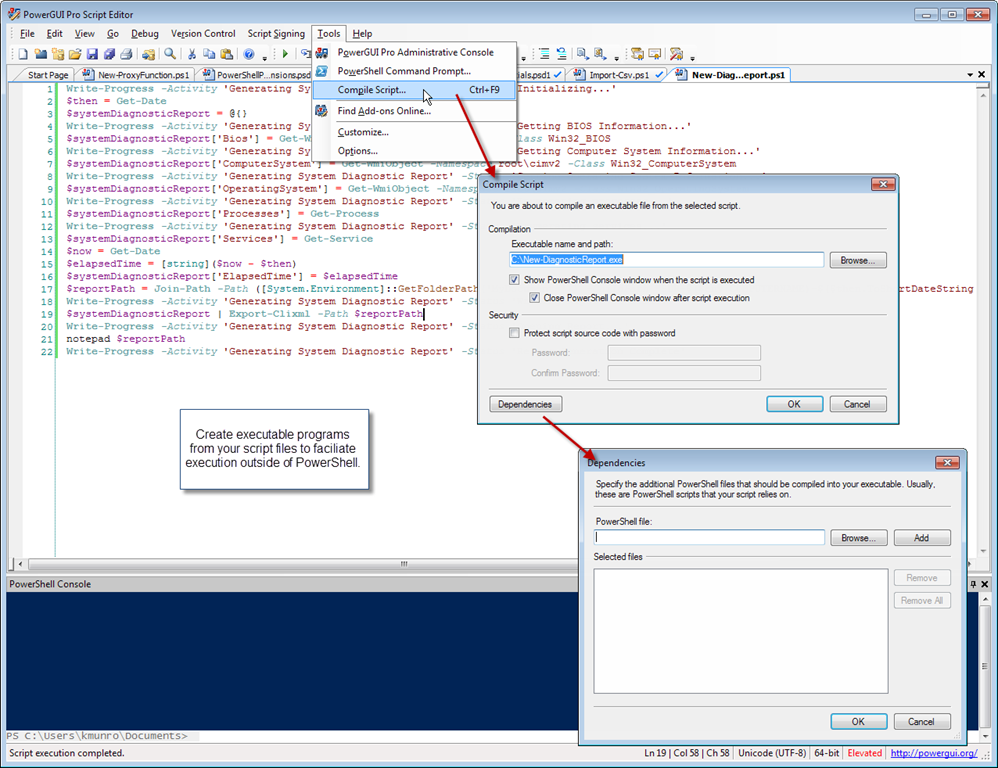
The additional options you get are:
- Show or hide the PowerShell Console window when executing the script,
- Automatically close or keep the console window (if you do want to show it),
- Protect the script source code by obfuscating it using a password you specify,
- Add other PowerShell scripts to the exe (if you have script which your main script is using).
[UPDATE] If your script access parameters – so will the exe file it generates. So for an executable generated from a script like:
param ($MyParam1, $MyParam2) "MyParam1: $MyParam1""MyParam2: $MyParam2"
You may use a command line like:
c:\Generated.exe -Arguments -MyParam2 "Value2" -MyParam1 "Value1"
To try this feature, you can install a trial version of PowerGUI Pro from here.
(Screenshot taken from the original PowerGUI 3.0 announcement which lists a lot of other great features we shipped in that release)

 Subscribe by email

 Dmitry's Blog: Cloud, PowerShell and beyond
I like this feature.
An extremely cool enhancement would be allow for other payloads that get compiled into the executable. I was thinking about assemblies and native executables.
I have a PowerShell script that uses cURL.exe that I need to distribute as one executable.
Klaus
Klaus, try adding cURL.exe as a “PowerShell script” Dependency – I have not tried this myself but it should probably work…
Does this work? I am curious…
Excellent facility. I’ve had complications before trying to talk someone through starting PowerShell, setting execution policy etc etc – so this could simplify things in those cases.
Of course, you can do this natively (and WPK, the pre-“ShowUI” code from James Brundage, let you produce exe’s from scripts quite easily) – but this is seamless.
I assume you need PowerShell installed wherever the .exe is going to run – so I gues it could be a problem in some cases targetting legacy (e.g. XP) machines…
Chris, yes, powershell.exe is indeed required – your assumptions are correct.
Is it possible to compile exe files with the basic version of Powergui?
Jonas, unfortunately, at the moment this is a Pro feature.
Is it possible (there’re any way(s)) to revert the code inside the exe back to Ps script?
a very nice feature.
however you need to have all the cmdlets on the featured machine to i guess. it do not compile the cmdlets needed into the exe file (atleast not on my tests)
so it is not only powershell.exe that is needed but also the cmdlets you want to use on the machine running the compiled file ?
or am i doing something wrong here 🙂
You should be able to add the modules that your script needs using the Dependencies button. If this for some reason does not work for you – please post the repro steps to our forum at http://powergui.org
Reblogged this on VM.Blog. and commented:
Good post on how to run PS scripts as “.exe”
Is it possible to decompile the exe back to PS1 in order to view the source code?
This depends on whether you select the “Protect source code” checkbox.
Is it possible to add the Quest AD extension to this exe?
The cmdlets need to be installed on the target machine separately. If they are – you can obviously use them in the exe – just add the snapin in your code.
If you compile your script to an exe this way, does the computer on which the file is executed need to have execution policy set to allow all?
I am actually no longer on the PowerGUI team – so I am not sure. You can give it a try – PowerGUI is now just a free download.
Is there any way to have the .exe run from the x86 powergui. I am having a issue running the exe when trying to connect to a databse
If you are on Windows x64 you should have both PowerGUI x64 and PowerGUI x86 installed. My understanding is that x86 PowerGUI will create x86 exe… However, I am not 100% sure. If this does not work – try asking in the forums at http://powergui.org
Hi, i think that i saw you visited my web site thus
i came to “return the favor”.I’m attempting to find things to enhance my site!I suppose its ok to use some of your ideas!!
Hello,
I have 25 scripts and a main script that calls these scripts. I add all scripts for dependency to create an exe from main script. Exe is created succesfully but it doesn’t work fine (as script version). A loop occurs and exe doesn’t finish.
Do you have any suggestion?
Regards
Unfortunately, I am no longer on the PowerGUI team. Please ask the question in PowerGUI forums at http://powergui.org
Hi. When I run the exe, I need it to find the path that the code is being run from. I use the code:
$leftFileDirectory = [System.IO.Path]::GetDirectoryName($myInvocation.MyCommand.Definition)
However, when its ran through the packaged .exe it always finds the path:
C:\temp\Quest Software\PowerGUI\15cc29fb-e118-4fdc-b247-1cd8cd0507a4\
I assume its becuase the .exe software routes it through a PowerGUI specified location. Is there a fix for this at all.
Thanks in advance
Can you try this:
$Global:ScriptPath = (Split-Path $script:MyInvocation.MyCommand.Path) + “\”;
It doesn’t work for me.
Try escalating to the PowerGUI team via PowerGUI community here: http://en.community.dell.com/techcenter/powergui/
Hi,
Currently i am also facing the same problem. Did you get a solution for the same? Please help me out
As much as this post is helpful, it is still highly insecure even today.
– The exe is a packed archive, if no password is set to secure the content one can use a tool like 7zip to read it as an archive and extract the ps1 script.
– The script is exposed, at run time, after the password is read.
It could be helpful, but it’s giving people a false sense of security which makes it even more insecure!
I wrote a script. compiled it. Then opened up the exe with 7 zip. I don’t see my original script anywhere. I see the “text” file where it should be but it’s not plain text. I’d like a secure executable for something im working on, don’t want prying eyes looking at the source, if i can’t do that with this, I have another route I can go, but this is much simpler. Where can i see the source code when I open it up?
Nevermind I extracted the text file with 7 zip, and low and behold there is my script. Dang it! oh well back to the going the long way around 😦 I was hoping this would be a super simple way to hardcode things users shouldn’t see in the script. Note to self, the easy way out never works! lol
Спасибо Дмитрий за информацию. Есть также другие инструменты компиляции скриптов (скриптовые), например скрипт PS2EXE. В результате его работы исполняемый файл получается более быстро запускаемый, чем от PowerGUI
Good feature, but the .exe start is slow.
John Rossati
I installed PowerGUI 3.8. anf the compile script option is grayed, how can I enable it?
thanks
I installed PowerGui 3.8, and the option “Complie Script” is grayed and I can’t press it, how can I enable it?
thanks,
Ortal
Is this the latest version and a clean install?
I believe this feature used to require a commercial license but has later been moved to the free version.
If this is not a clean install, try locating and deleting (or renaming) PowerGUI folder in your profile – PowerGUI will then recreate the default profile next time it starts.
If nothing helps – try asking at http://powergui.org
In my power shell script(task_scheduler.ps1) when runs in a system, it creates a daily task in task scheduler. This daily task is to run another power shell file (action.ps1) in the system.
Now I would like to convert task_scheduler.ps1 into an exe file. Since this file accesses action.ps1 file, I tried giving the same as “dependency” in Power GUI (while compiling script).
Now, the task is getting scheduled. But the task is not running the action.ps1 file. As the file is not present in the specified path.
How shall I get the path whether the dependency ps1 files get saved?
Hi!
How do you call a dependency in your script?
Let’s say I created a powershell script “Test.ps1” with the following code:
$word = Get-Content Test.txt
echo $word
I go to ‘Tools’ –> ‘Compile Script’ –> Select ‘Test.txt’ in a dependency to this cript & save the exe file. However the exe ps1 script cannot access the dependency.
Am I doing something wrong? Is there like a general PowerGUI Variable in which the dependenies can be called?
I can’t seem to find any information on how to call / access the dependant script. Forums are not available anymore etc.
Many thanks in advance for your assistance 🙂
I don’t think this feature was ever implemented. So basically you need all dependencies to either be on the target machine or inside that script that you are compiling.
Windows’ security protocols make it difficult to copy files to workstations. I have started to write self-installing section at the beginning of my PS1 files, that copy the EXE and all dependent files first then it tests for the file locations. First I make a new directory on the workstation (usually: C:\OEM). After that, I copy files and verify to the files to C:\OEM\. The only thing is to do the first install I have to run the original PS1 file as admin to get the files to copy from the called from a directory. If I run the EXE then the program tries to call $env:temp location and my dependent files are located on the server. I have tried 5 different variables for the $PSScriptRoot and none work. I even paused the EXE and tried to grab the path with:
$ProcessName = ‘MyConvertedScript’
(Get-Process -Name $ProcessName).path #note: no extension on name
but then path is blank. If I open Task manager and click on properties I can see the path of the paused process. It is there I just don’t know how to get to it.
Nick in Chicago
Hi,
Thanks for the beautiful post.
I have the problem here, the converted exe file doesn’t run on machines where execution policy set to default or restricted.
Do you have any option to run this exe on these specific conditions?
how can i select dependencies that are not in the same directory as the main script, but are in subdirectories?